Quick answer: Most of the time, why automations break comes down to a handful of boring causes: an app connection expired, a step matched the wrong person or email, the meeting had no summary, a title filter caught too much or too little, a re-run created duplicates, or the AI started writing differently. Each has a simple fix, and the run history usually tells you which one it was.
The Monday digest stopped arriving. Nobody noticed for three weeks. When someone finally asked, the cause was that the person who built it had left, and their Slack connection went with them.
That's the typical shape of an automation failure. Not a dramatic crash, just a quiet stop or a slightly wrong result that nobody owns. Below are the failures we see most with meeting automations, what each looks like from the outside, and how to fix it so it stays fixed. The scenarios are illustrative, not customer stories.
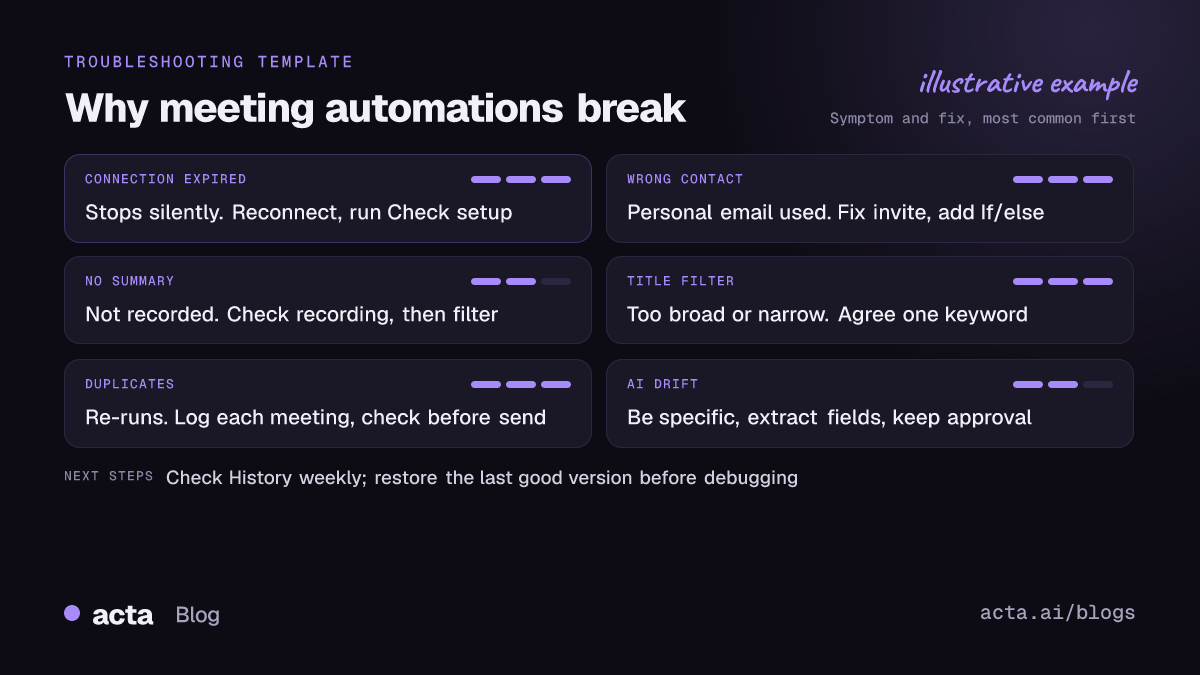
Why automations break: the short version
Almost every broken automation I've looked at falls into one of three buckets:
- The world changed and the automation didn't: a password reset, a renamed meeting, a new CRM field, someone leaving.
- The input was different from the test. You tested on a tidy call; real life sent a 90-minute workshop with eleven people.
- It ran more (or less) than you thought. Duplicates from a re-run, or nothing at all because a filter was too strict.
Keep those buckets in mind. When something breaks, asking "which bucket?" gets you to the cause faster than staring at the steps.
Why did my automation suddenly stop running?
Nine times out of ten: an expired app connection. Tokens expire, people change passwords, IT revokes access, or the person whose account powered the connection leaves the company.
Different tools handle this differently. Zapier, for example, notes in its guide to troubleshooting errors in Zaps that it turns a Zap off automatically when 95% of its runs error over the last 7 days. Which is sensible. But it also means a broken Zap can go silent rather than loud.
How to fix it for good:
- Reconnect the app, then run Check setup in Acta Agent Builder. It flags missing settings and app connections before the next run tries.
- Don't build team agents on someone's personal account if you can avoid it. If the agent posts to #sales-wins, it shouldn't die when one AE leaves.
- Write down who owns each connection. One line in the agent's name or description is enough.
Why did it update the wrong contact or the wrong person?
This one is sneakier, because the run "succeeds". The note just lands on the wrong record.
In Acta, the HubSpot, Salesforce and Zoho actions add a note to a contact matched by email. That's reliable when the attendee joined with their work email. It goes wrong when Dana joins from her personal Gmail, or when two people from the same company share an alias like sales@.
Owner names cause the same trouble inside your team. An action item owned by "Sam" is fine until you hire a second Sam.
- Check which email the meeting actually used. If it's the wrong one, fix the calendar invite, not the agent.
- Add an If/else: if no external attendee has a work email, skip the CRM step and send yourself a Slack note instead.
- For CRM updates you care about, put a human approval step in front for the first few weeks. Our guide to updating the CRM after a sales call walks through the setup.
Why didn't anything happen after my meeting?
The Meeting ended trigger in Acta fires when the summary is ready, not the second the call ends. No summary, no trigger. And a meeting gets no summary when it wasn't recorded at all: the bot wasn't let in, the desktop app wasn't running, or someone forgot to start the Chrome extension.
So the first question is "was it recorded?", then "did it finish processing?". If you're recording people, make sure they've agreed where the law requires it. Our guide on recording consent and what to tell participants covers what to say.
The second most common cause is the next section.
Why does my title filter catch the wrong meetings?
Title filters are the cheapest way to target an agent and the easiest to get wrong.
- Too broad: "contains 'client'" also matches "Client prep (internal)" and "Client churn review". Now your follow-up email goes to colleagues.
- Too narrow: "contains 'Weekly Sync'" stops matching the day someone renames it "Weekly sync + planning", or schedules it in another language.
What works better: agree on one word for the meetings an agent should touch ("Client call", "Pipeline review") and tell the team. If titles are a mess you can't fix, add an AI step that sorts the meeting ("is this an external client call? yes/no") and branch on that. Slower, but far more forgiving.
Why am I getting duplicate messages?
Usually one of three things:
- You re-ran it. You fixed a step, re-ran last week's meetings, and every Slack post went out twice.
- Two things do the same job. The Slack integration already posts meeting notes to #product, and then you built an agent that also posts a recap there.
- Two triggers overlap. One agent runs on Meeting ended, another on New action item, and both email the same owner.
The fix that works in any tool is a "have I done this already?" check. Keep a log, and look it up before you send.
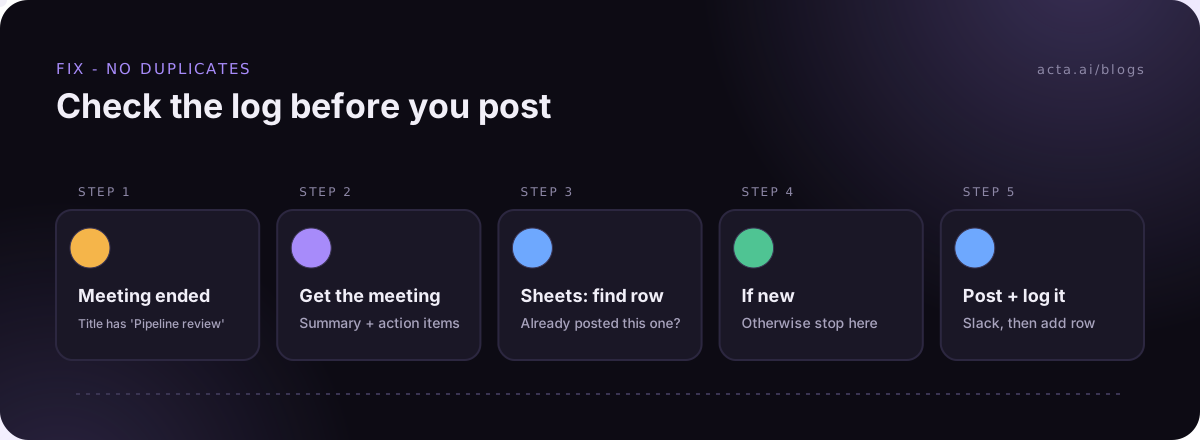
In Acta that's a Google Sheets "find rows" step on the meeting, an If/else, and an "add row" once it's sent. Five minutes to add. It also gives you a plain list of everything the agent did, which your manager will like.
What about limits: loops, long waits and rate limits?
Limits rarely break an agent on day one. They break it on the busy week.
- For each handles up to 100 items per run in Acta. Looping over "all open action items" is fine for a team of eight. For the whole company, filter first (by owner, by meeting, by overdue).
- Wait can pause up to 30 days. Long waits are fragile because plans change in between. A "remind in 14 days" step doesn't know the deal closed on day three. Prefer a scheduled agent that checks current data, like "every Monday, list overdue action items", over a long wait inside one run.
- Rate limits on the apps themselves. Slack's Web API rate limits are set per method and per workspace, and a burst of messages can get throttled. If one agent posts 60 things in a minute, rethink it as one digest.
- App event triggers (a new Jira issue, a HubSpot deal stage change) are checked about every 5 minutes. If you expected instant, that's not a bug.
Why does the AI output change over time?
AI steps aren't a fixed template. Same instruction, slightly different meeting, slightly different output. Over weeks, that drift adds up: summaries get longer, bullet formats change, a field you parse downstream suddenly says "N/A" instead of being empty.
What helps:
- Be boringly specific. "Max 5 bullets. Each starts with the owner's first name. No intro sentence."
- Extract, don't describe, when a later step needs the value. Use the AI step to extract fields (owner, due date, amount) rather than parsing free text.
- Use the structured data where it exists. Action items with owners and due dates, and decisions, already come out of Acta as data. Don't ask the AI to re-find them in prose.
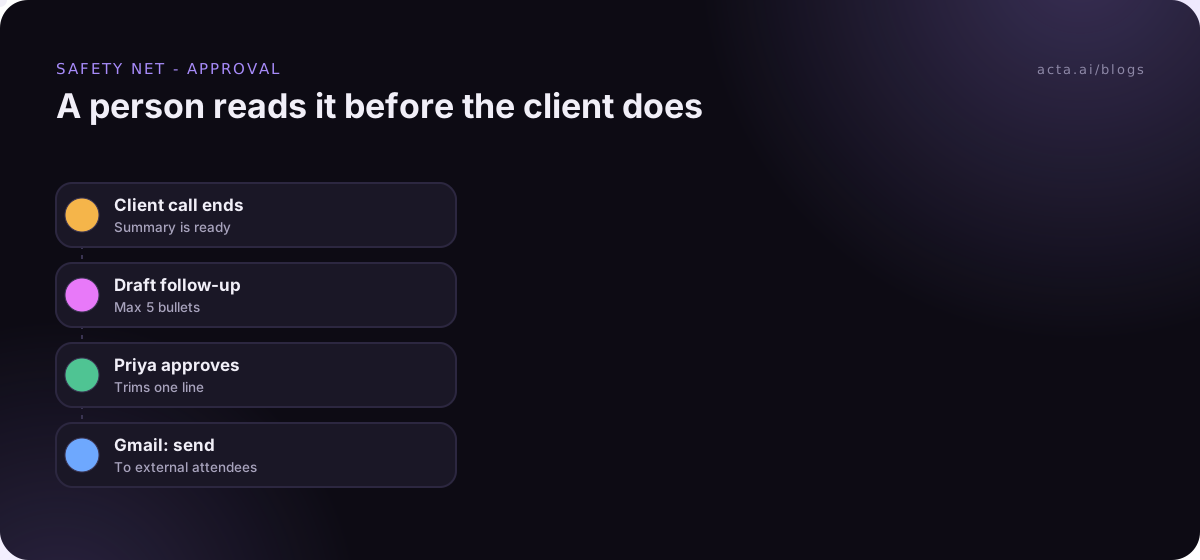
- Keep approval on anything external. A person reading the draft catches drift on day one, not week six.
How do you catch broken automations early?
Knowing why automations break doesn't stop them breaking. But you can make sure you hear about it in a day instead of three weeks.
- Look at History. In Acta it shows what every step did on every run. A ten-minute look every Friday at the agents that touch customers is enough for most teams.
- Use approval as a tripwire. If an agent pauses for approval and the Approvals inbox stays empty for a week, something upstream stopped. And if nobody answers before the approval expires (24 hours by default, up to 7 days), nothing is sent, which is the safe way to fail.
- Restore, don't hot-fix. Each turn-on saves a version. If yesterday's change broke it, restore the last good version first, then debug.
- Have a failure path. n8n has a dedicated Error Trigger for error workflows, which is a good pattern. In any tool, a branch that sends you a Slack message when a step returns nothing is a cheap version of the same idea.
- Test changes like new builds. Every edit gets a test run first. Our post on how to test automation without sending has the checklist.
Is it worth automating at all, then?
Yes, with eyes open. An agent that drafts the follow-up after every client call still saves real time even if it needs a nudge once a month. The ones that hurt are the ones nobody owns.
My rule: if I can't name who gets the message when an automation breaks, it's not ready. If you're picking what to build first, start from our list of meeting automation workflows, or look at the ready-made agents on the Acta agents page.
Frequently asked questions
What is the most common reason automations break?
An expired app connection. Someone changed a password, left the company, or access was revoked. Reconnect it, then run Check setup.
How do I stop duplicate messages?
Log what the automation has already handled (a Google Sheets row per meeting works) and check the log before sending. Also check you don't have an integration and an agent posting the same thing.
Why didn't my agent run after a meeting?
Either the meeting wasn't recorded or summarized, or the title didn't match your filter. Check the meeting in Acta first, then the filter.
Can AI steps be trusted to stay consistent?
Mostly, if the instruction is specific and you extract fields instead of parsing prose. Keep human approval on anything a customer will see.
How often should I check my automations?
Glance at History after the first few runs, then a quick weekly look at anything customer-facing is plenty for most small teams.
See the plans that include Acta Agent Builder on the pricing page.