Every step and app action, explained
StepsActionsReferenceUpdated Oct 31, 2026
You won't need most of these at first. A typical agent uses a trigger, an AI step and an Action.
Steps
| Step | What it does | Example |
|---|---|---|
| Acta data | Looks things up in your meetings: a search, meetings, one meeting's summary, action items or decisions. | Last week's decisions |
| Documents | Reads files you added in OneChat, or finds the parts that answer a question. | The pricing sheet |
| Knowledge | Finds information in your meetings and files, on the web, on web pages you give, or in Jira. | News about a competitor |
| AI | Writes, sums up, sorts or pulls out details. Tell it what to do and what to work from. | Write a follow-up email |
| AI agent | An AI that decides which tools to use, several times if needed. For jobs that can't be planned step by step. | Research a lead |
| If / else | Checks something and goes one of two ways: Yes or No. | Is the deal over $10,000? |
| Switch | Goes one of several ways depending on a value. Anything else goes to Otherwise. | Bug, billing or how-to |
| Merge | Joins branches back together so the steps after it run either way. | After both branches |
| For each | Repeats some steps once for every item in a list. Done carries on after the last one. | Each guest of a meeting |
| List tools | Keeps the items that match, sorts them, removes repeats, keeps the first few. | Top 5 open deals |
| Edit values | Tidies values without AI: change case, pull out a number, add up, format a date, add days. | Due date = today + 7 |
| Memory | Remembers things between runs, so the agent doesn't do the same thing twice. Seen before? goes Seen or New. | Welcome each customer once |
| Wait | Pauses for a while, or until a date and time, then carries on. | Wait 2 days, then remind |
| Human approval | Stops until you check it in Approvals (or by email). You can edit the text first. | Check before sending |
| Action | Does something in one of your apps (see below). | Send a Slack message |
| HTTP request | Calls another app's web API, for apps that have no steps here yet. | Get deals from Pipedrive |
| Run another agent | Starts one of your other agents and hands it values. Split big jobs into small agents. | An Enrich lead agent |
| Drafts to copy | Saves posts (LinkedIn, newsletter…) in Drafts for you to copy. Nothing is posted. | A LinkedIn post |
What agents can do in your apps
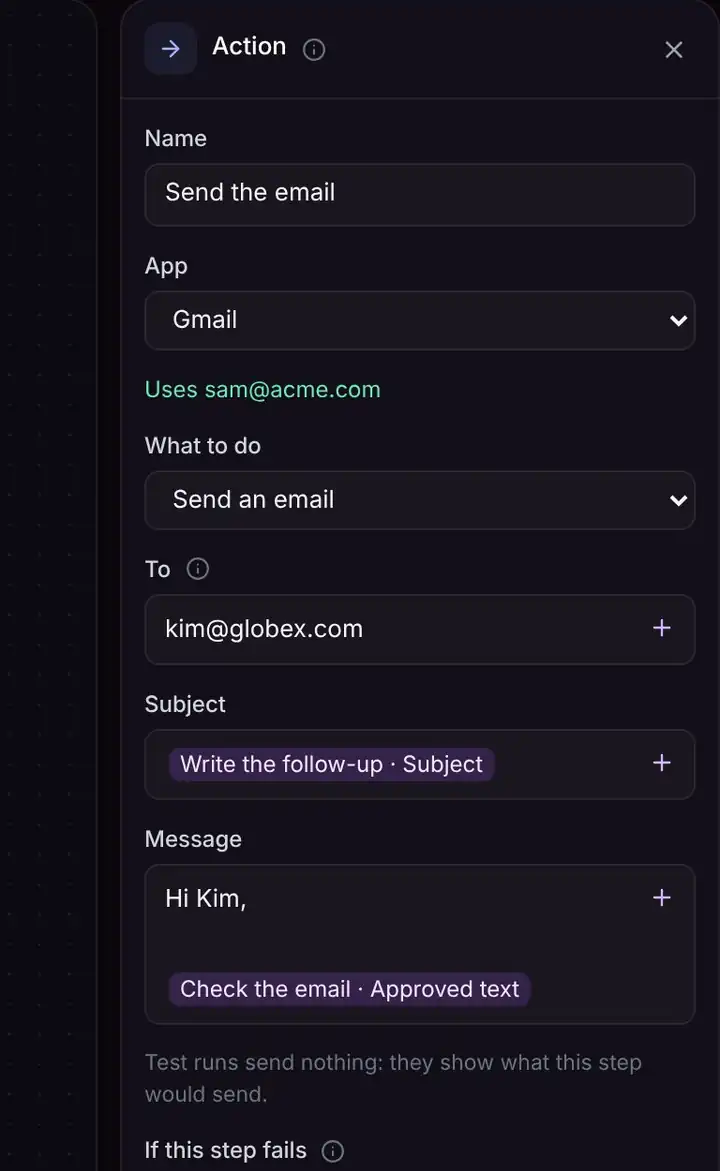
Add an Action step, choose the app, then What to do. The fields for that action appear below it, and under the app it says which account it uses.
| App | Actions |
|---|---|
| Gmail | Send an email, save an email as a draft, reply to an email, save a reply as a draft |
| Slack | Send a message to a channel or person |
| Google Sheets | Add a row, update a row, find rows |
| Google Calendar | Create an event (with a Meet link), find free times |
| HubSpot, Salesforce, Zoho | Add a note to a contact |
| Jira | Create an issue |
| Asana | Create a task |
| Zendesk, Freshdesk | Create a ticket, reply, add a private note, update a ticket |
| Chat | Reply in chat (for Chat message agents) |
| Webhook | Send data to another system |
Troubleshooting
Which step should I use for writing?
Use AI for one piece of writing or sorting. Use AI agent only when it must decide for itself which tools to use, several times.
Do steps without AI cost anything?
No. Only AI steps use AI credits; each run in History shows roughly how many it used.
Related
Still stuck? The Acta team can help. support@acta.aiContact us